

bumped for update
This section allows you to view all posts made by this member. Note that you can only see posts made in areas you currently have access to.
Pages1
#1
Character Vertexes and Textures / Re: DullRazor's (Attempt) At Textures: Update W/ Hueco Mundo PS1
December 31, 2009, 07:25:10 PM #2
Character Vertexes and Textures / DullRazor's (Attempt) At Textures: Update w/ Heuco Mundo & Tank ROB (12/31/09)
December 31, 2009, 04:26:41 AM
So, I just started texturing. This is my first batch. A few of them I made for me and some fellow ROB mains on SWF/Smashboards. I'll post the pics of them here, but not a dl link. But, there are some that I made that are freely accessible. Without further ado:
Private Showcase
Chrome ROB
(One for my friend JCaesar)

Starscream (Gen1 Transformers) ROB
(One for Sudai)

Optimus Prime (Gen1 Transformers) ROB
(One I made for myself)

Public
Battle Worn ROB:
(Basically the idea was to put Wall-E+Meatgrinder together)


(just a close up of the scratches and stuff)
http://www.mediafire.com/?u0uuygm5yfg
Soundwave (Gen1 Transformers) ROB:

(ignore the slight color differential btwn upper/lower, I've fixed this. They match much better)
http://www.mediafire.com/?z1zungqdzqe
Hueco Mundo Pokemon Stadium:
Tried to keep it black/white/grayscale. A few things, I just couldn't get right... but, ah well. Hope you like, as its one of the few "complete" PS1 hacks in terms of all transformations being texturized


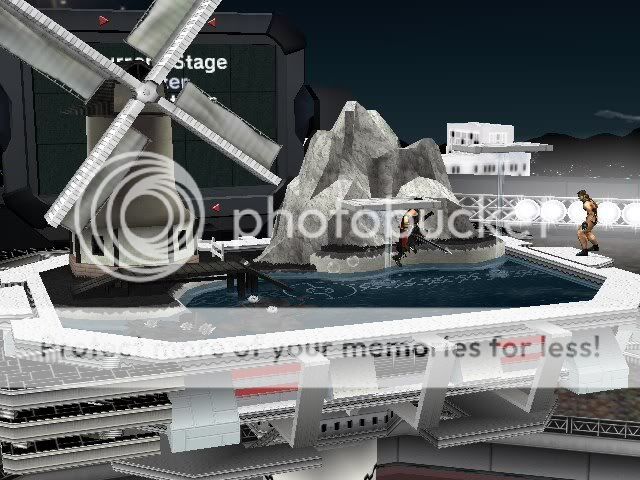
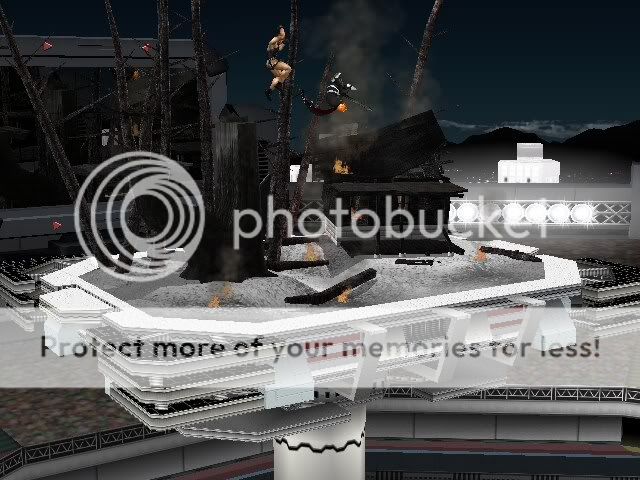
(Forgot to take a pic of the rock transformation, but- its there)
http://www.mediafire.com/?mdnycygvofx
(may need to change filename to remove the "_en" when putting in your SD card)
TANK ROB


http://www.mediafire.com/?zzzz24znynk
Hope you like them, and constructive critique is welcome.
Scheduled Textures
-Reverse Portal ROB: 0%
-Cosbydorf (anyone have a link to a ganon model without the cape?): 0%
Suggestions:
Private Showcase
Chrome ROB
(One for my friend JCaesar)
Starscream (Gen1 Transformers) ROB
(One for Sudai)
Optimus Prime (Gen1 Transformers) ROB
(One I made for myself)
Public
Battle Worn ROB:
(Basically the idea was to put Wall-E+Meatgrinder together)
(just a close up of the scratches and stuff)
http://www.mediafire.com/?u0uuygm5yfg
Soundwave (Gen1 Transformers) ROB:
(ignore the slight color differential btwn upper/lower, I've fixed this. They match much better)
http://www.mediafire.com/?z1zungqdzqe
Hueco Mundo Pokemon Stadium:
Tried to keep it black/white/grayscale. A few things, I just couldn't get right... but, ah well. Hope you like, as its one of the few "complete" PS1 hacks in terms of all transformations being texturized
(Forgot to take a pic of the rock transformation, but- its there)
http://www.mediafire.com/?mdnycygvofx
(may need to change filename to remove the "_en" when putting in your SD card)
TANK ROB
http://www.mediafire.com/?zzzz24znynk
Hope you like them, and constructive critique is welcome.
Scheduled Textures
-Reverse Portal ROB: 0%
-Cosbydorf (anyone have a link to a ganon model without the cape?): 0%
Suggestions:
#3
Help / Question about blending options in Photoshop
December 26, 2009, 10:18:40 PM
So, Im doing my own textures and the like... just starting out. Im fairly good with photoshop, but I don't know how well those skills will transfer over. My questions are simple really:
I really don't know how to turn something that is in color... white. I mean, i know desaturate or black/white, and I normally up the brightness with comparable contrast. Is there an easier way?
Secondly, I've always used the multiply (well, among others) in my options in a new layer (normal, multiply, overlay...etc etc) so as to keep the integrity of what's underneath (you know how doing "normal, basically just colors OVER the whole thing, right? Well, in at least normal images). I was wondering if "Normal" blending or whatever will keep the detail in terms of textures.
EX: If I use "normal" to color ganon's hair, will it just make a big blob of color (blue, for example), or will you still be able to see his "dreads" as it were?
Thanks in advance.
I really don't know how to turn something that is in color... white. I mean, i know desaturate or black/white, and I normally up the brightness with comparable contrast. Is there an easier way?
Secondly, I've always used the multiply (well, among others) in my options in a new layer (normal, multiply, overlay...etc etc) so as to keep the integrity of what's underneath (you know how doing "normal, basically just colors OVER the whole thing, right? Well, in at least normal images). I was wondering if "Normal" blending or whatever will keep the detail in terms of textures.
EX: If I use "normal" to color ganon's hair, will it just make a big blob of color (blue, for example), or will you still be able to see his "dreads" as it were?
Thanks in advance.
Pages1