Guys, I don't get it, I've been making custom portraits for a few weeks for various characters and haven't had many problems with it.
I'm using Photoshop, and BrawlBox, and I know what to replace in my common5, I have many successful portrait swaps... its just...
Every time I try to change Kirby's portraits it never ever goes well?
Can someone help me figure out why? I've included two non-working portraits for some custom textures below:
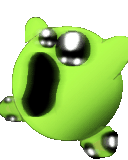
I made this custom portrait for:
Alien Kirby
By DasDonkeyTeam
Notes:
I didn't do any detail to the feet. Made in Photoshop, but yes, this doesn't work!!!! Before loading the character select screen the game freezes and holds a low beep until I hard reset.
This doesn't work either.
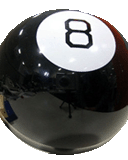
I made this custom portrait for:
8-Ball Kirby
By Picano
Here's another failed portrait that won't work. It's a stock image that I cropped, and used Photoshop to downscale it and give it transparency. Just like the Kirby portrait; I indexed the png, and did color reduction to match that of the original kirby portraits. Both are under 240 colors, 128 x 160, and png with transparency.
... So what gives?
I'm using Photoshop, and BrawlBox, and I know what to replace in my common5, I have many successful portrait swaps... its just...
Every time I try to change Kirby's portraits it never ever goes well?
Can someone help me figure out why? I've included two non-working portraits for some custom textures below:
I made this custom portrait for:
Alien Kirby
By DasDonkeyTeam
Notes:
I didn't do any detail to the feet. Made in Photoshop, but yes, this doesn't work!!!! Before loading the character select screen the game freezes and holds a low beep until I hard reset.
This doesn't work either.
I made this custom portrait for:
8-Ball Kirby
By Picano
Here's another failed portrait that won't work. It's a stock image that I cropped, and used Photoshop to downscale it and give it transparency. Just like the Kirby portrait; I indexed the png, and did color reduction to match that of the original kirby portraits. Both are under 240 colors, 128 x 160, and png with transparency.
... So what gives?