

I'm so happy I finally saw this thread. Okami is probably my #1 most wanted content for Brawl right now. I can't wait to see what kind of things come out of this!
This section allows you to view all posts made by this member. Note that you can only see posts made in areas you currently have access to.
#3
Help / Battlefield music problems
December 22, 2010, 10:35:45 PM
Hey everyone, I have a problem that I hope is easy to answer. For a long time I haven't been able to enter the music for battlefield in the menu (where you adjust how frequently a song plays). The game stalls when I try to go into that menu.
I can edit any other stages music frequency, and I can play the battlefield level or replace it's music. I just can't edit the frequency at which music plays.
Any ideas as to what is causing this?
I can edit any other stages music frequency, and I can play the battlefield level or replace it's music. I just can't edit the frequency at which music plays.
Any ideas as to what is causing this?
#4
Help / Re: Final Destination is EVIL
December 13, 2010, 02:25:10 AM
*Facepalm*
Why didn't I think of that?
Oh well, it works now. :yay:
Why didn't I think of that?
Oh well, it works now. :yay:
#5
Help / Final Destination is EVIL
December 12, 2010, 04:24:26 AM
Okay, I'm stumped on this one. Every time I select FD my game stalls, it doesn't matter if I have a custom stage over it or if there's nothing over it. I tried removing any relevant custom music that could be used in it and that doesn't matter either.
The only thing that could possibly be affecting it are the codes I have. I recently added two codes to my GCT file:
No FastFall on C-stick [spunit262]
0485E27C 40A20008
0485E278 2C000001
Respawn invicibility [Standardtoaster]
04B88F80 00000001
So unless those change it I have no idea what the hell is happening. It obviously doesn't happen in Vanilla Brawl. Any ideas?
The only thing that could possibly be affecting it are the codes I have. I recently added two codes to my GCT file:
No FastFall on C-stick [spunit262]
0485E27C 40A20008
0485E278 2C000001
Respawn invicibility [Standardtoaster]
04B88F80 00000001
So unless those change it I have no idea what the hell is happening. It obviously doesn't happen in Vanilla Brawl. Any ideas?
#6
Character Vertexes and Textures / Re: Brawl Young Link [New Razor Blade in progress, expressions being fixed)
September 11, 2010, 02:29:06 AM
Okay, so the motion pack is required. Would my animations work with it if I imported them into the motionetc file? Or would they need to be changed somehow?
Sorry for bothering you with these questions, but I'm really excited to use younglink in brawl, but I really like the animations I made too.
Sorry for bothering you with these questions, but I'm really excited to use younglink in brawl, but I really like the animations I made too.
#7
Character Vertexes and Textures / Re: Brawl Young Link [New Razor Blade in progress, expressions being fixed)
September 10, 2010, 02:50:44 AM
Well... I just nearly peed my pants when I saw it released in brawlvault. This is awesome!
Quick question though, what is the FitLinkMotionEtc file specifically used for in this hack, or rather, is it mandatory?
I ask simply because I've made a number of custom animations for my own personal use when I play Link and I'd like to know whether I'd have to import them into your file or edit them or whatnot.
But this hack definitely just made my day. Thanks a million! :kdance:
Quick question though, what is the FitLinkMotionEtc file specifically used for in this hack, or rather, is it mandatory?
I ask simply because I've made a number of custom animations for my own personal use when I play Link and I'd like to know whether I'd have to import them into your file or edit them or whatnot.
But this hack definitely just made my day. Thanks a million! :kdance:
#8
Help / Re: Why can't my Windows Vista get BrawlBox?
July 15, 2010, 08:34:15 PM
Like Moe I also have had no problem with brawlbox v0.63d on Vista.
When I upgraded to Windows 7 it wouldn't run, but I ran it in compatibility mode and it worked fine.
If you have v0.63d and it's not working, maybe you could try running it in compatibility mode with service pack 3. I don't know if that will do anything for you but it's worth a try.
When I upgraded to Windows 7 it wouldn't run, but I ran it in compatibility mode and it worked fine.
If you have v0.63d and it's not working, maybe you could try running it in compatibility mode with service pack 3. I don't know if that will do anything for you but it's worth a try.
#9
Help / Problems with editting Onett
July 04, 2010, 09:57:26 AM
Is it just me, or is it impossible to edit the stageposition for Onett. Every time I make the slightest change to one of it's bones the game freezes when I try playing the level.
My intent was to extend the level off to the right to allow some more room to fight near the houses there (by editing the CamLimit1N and Dead1N bones). Do the camera limits need to be kept in a specific aspect ratio or something (so I'd need to raise the level's ceiling)?
That's the only thing I can think of. Any ideas as to what's going on here?
My intent was to extend the level off to the right to allow some more room to fight near the houses there (by editing the CamLimit1N and Dead1N bones). Do the camera limits need to be kept in a specific aspect ratio or something (so I'd need to raise the level's ceiling)?
That's the only thing I can think of. Any ideas as to what's going on here?
#10
Character Vertexes and Textures / Re: Vladislak's Textures (Eva textures and ROB up!)
May 24, 2010, 10:59:01 PMQuote from: DocStrange on May 24, 2010, 01:41:50 PMlol. Somehow I can't see Shinji having the guts to run around with a rocket launcher. xD
These look really nice (aside from a few spots, which I'm sure is just due to how Zamus' texture is set up) Next up: Shinji on Snake lol!
But yeah I thought of that too, I might try to do that.
As for the texture issue, if it's the thing on the back of Rei's head, I plan to fix that if I can.
Quote from: LordNOaH on May 24, 2010, 08:57:58 PMYeah I'm not sure why that happened. It does look pretty trippy when you play it though. ;D
Texture error on the eyes?? if that isn't on purpose, just import it again with a different format that works in-game
cool stage
I'll see what I can do though.
#11
Character Vertexes and Textures / Vladislak's Textures (Eva textures and ROB up!)
May 24, 2010, 07:35:25 AM
Hey peoplez. This thread is where I'll post my textures (both for stages and characters), I don't have a whole lot at the moment but I plan to keep building on my library.
But you didn't click on this thread to read this crap, on to the textures! :af:
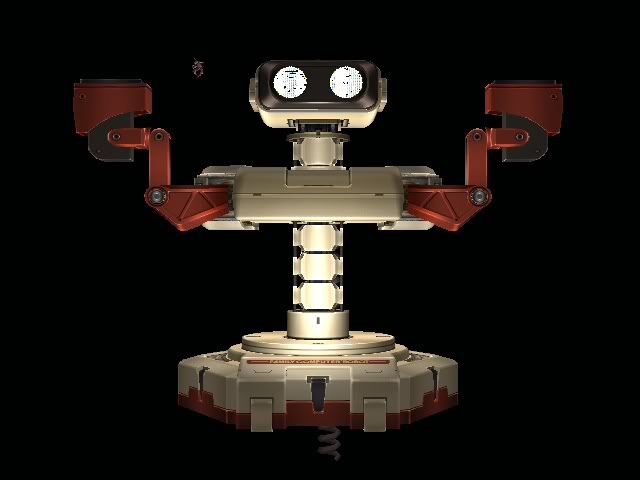
ROB (as a level)
You can now fight on ROB in this level that can go over Final Destination or Rainbow Cruise.
More images:
http://i963.photobucket.com/albums/ae118/Fallenseed/Brawl/al_100524_01091binout.jpg
http://i963.photobucket.com/albums/ae118/Fallenseed/Brawl/al_100524_0112binout.jpg
http://i963.photobucket.com/albums/ae118/Fallenseed/Brawl/al_100524_0114binout.jpg
The last image demonstrates how heavy characters can get from the bottom to the top; by entering the shaft that supports ROB (entrance at it's base) and jumping up from inside, exiting just under ROB's head. A fall-through platform is placed about 75% up the shaft so characters who can't use their recovery special in tight spaces can get up (Earthbound characters).
Download: http://www.mediafire.com/?z24mizwmumv
----------------------------
Evangelion Characters
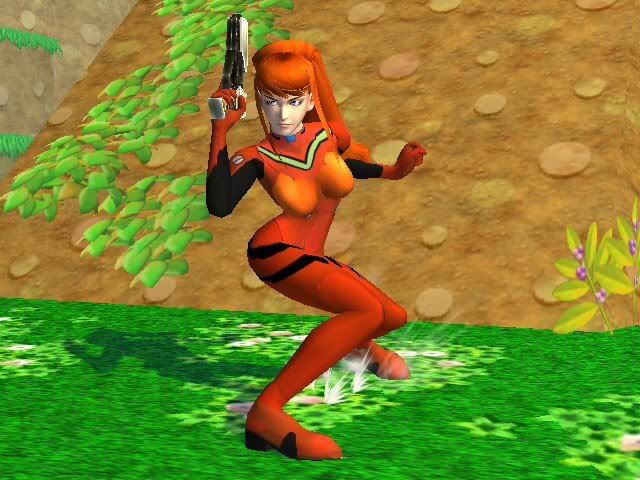
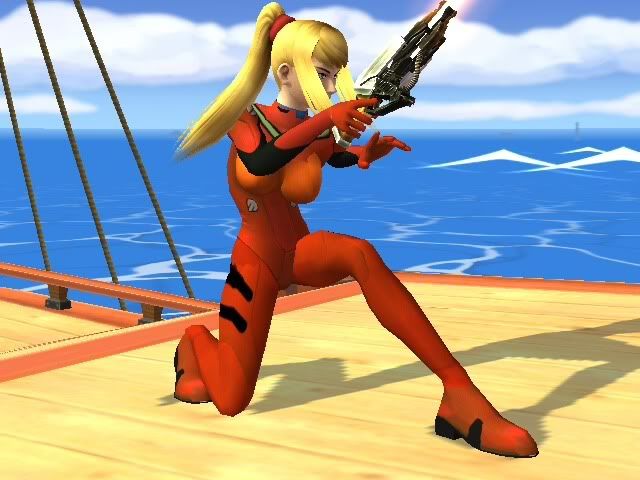
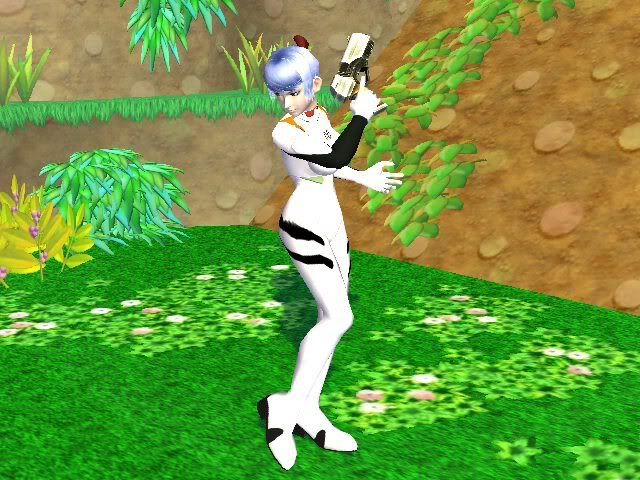
Yeah I'm a fan of Evangelion, and Zero Suit Samus seemed ideal for putting in a Plug Suit. So I made Asuka and Rei, both with and without appropriate hair changes
Asuka Soryu Langley
More images:
http://i963.photobucket.com/albums/ae118/Fallenseed/Brawl/al_100524_0019binout.jpg
http://i963.photobucket.com/albums/ae118/Fallenseed/Brawl/al_100524_00201binout.jpg
http://i963.photobucket.com/albums/ae118/Fallenseed/Brawl/al_100524_0020binout.jpg
Download: http://www.mediafire.com/?dm5ue13nxzw
----------------------------
Asuka Soryu Langley (Plugsuit only)
More images:
http://i963.photobucket.com/albums/ae118/Fallenseed/Brawl/al_100524_0057binout.jpg
http://i963.photobucket.com/albums/ae118/Fallenseed/Brawl/al_100524_00571binout.jpg
Download: http://www.mediafire.com/?20twxmytnmz
----------------------------
Ayanami Rei
Note: Texture has been updated, Rei no longer has that red band on the back of her head (in other words, these pictures are slightly outdated).
More images:
http://i963.photobucket.com/albums/ae118/Fallenseed/Brawl/al_100524_0023binout.jpg
http://i963.photobucket.com/albums/ae118/Fallenseed/Brawl/al_100524_0024binout.jpg
Download: http://www.mediafire.com/?m3otn2bzjne
----------------------------
Ayanami Rei (Plugsuit only)
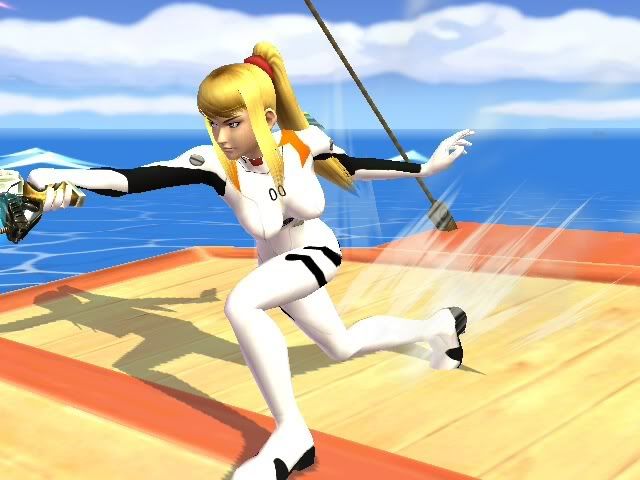
More images:
http://i963.photobucket.com/albums/ae118/Fallenseed/Brawl/al_100524_0058binout.jpg
http://i963.photobucket.com/albums/ae118/Fallenseed/Brawl/al_100524_00561binout.jpg
Download: http://www.mediafire.com/?20twxmytnmz
----------------------------
That's all for now, hopefully more to come.
But you didn't click on this thread to read this crap, on to the textures! :af:
ROB (as a level)
You can now fight on ROB in this level that can go over Final Destination or Rainbow Cruise.
More images:
http://i963.photobucket.com/albums/ae118/Fallenseed/Brawl/al_100524_01091binout.jpg
http://i963.photobucket.com/albums/ae118/Fallenseed/Brawl/al_100524_0112binout.jpg
http://i963.photobucket.com/albums/ae118/Fallenseed/Brawl/al_100524_0114binout.jpg
The last image demonstrates how heavy characters can get from the bottom to the top; by entering the shaft that supports ROB (entrance at it's base) and jumping up from inside, exiting just under ROB's head. A fall-through platform is placed about 75% up the shaft so characters who can't use their recovery special in tight spaces can get up (Earthbound characters).
Download: http://www.mediafire.com/?z24mizwmumv
----------------------------
Evangelion Characters
Yeah I'm a fan of Evangelion, and Zero Suit Samus seemed ideal for putting in a Plug Suit. So I made Asuka and Rei, both with and without appropriate hair changes
Asuka Soryu Langley
More images:
http://i963.photobucket.com/albums/ae118/Fallenseed/Brawl/al_100524_0019binout.jpg
http://i963.photobucket.com/albums/ae118/Fallenseed/Brawl/al_100524_00201binout.jpg
http://i963.photobucket.com/albums/ae118/Fallenseed/Brawl/al_100524_0020binout.jpg
Download: http://www.mediafire.com/?dm5ue13nxzw
----------------------------
Asuka Soryu Langley (Plugsuit only)
More images:
http://i963.photobucket.com/albums/ae118/Fallenseed/Brawl/al_100524_0057binout.jpg
http://i963.photobucket.com/albums/ae118/Fallenseed/Brawl/al_100524_00571binout.jpg
Download: http://www.mediafire.com/?20twxmytnmz
----------------------------
Ayanami Rei
Note: Texture has been updated, Rei no longer has that red band on the back of her head (in other words, these pictures are slightly outdated).
More images:
http://i963.photobucket.com/albums/ae118/Fallenseed/Brawl/al_100524_0023binout.jpg
http://i963.photobucket.com/albums/ae118/Fallenseed/Brawl/al_100524_0024binout.jpg
Download: http://www.mediafire.com/?m3otn2bzjne
----------------------------
Ayanami Rei (Plugsuit only)
More images:
http://i963.photobucket.com/albums/ae118/Fallenseed/Brawl/al_100524_0058binout.jpg
http://i963.photobucket.com/albums/ae118/Fallenseed/Brawl/al_100524_00561binout.jpg
Download: http://www.mediafire.com/?20twxmytnmz
----------------------------
That's all for now, hopefully more to come.
#12
Stages / Re: Mewtwo2000's [Finishing Soulsilver Intro stage] (21 may 2010)
May 21, 2010, 05:12:13 AM
I agree with Oizen and Data. Hyrule Castle in 3D for brawl would make my day. :P
#13
Stages / Re: Mewtwo2000's [Finishing Soulsilver Intro stage] (21 may 2010)
May 21, 2010, 03:48:20 AMQuote from: Mewtwo2000 on May 19, 2010, 09:04:56 AMPressing plus to assign the new object to a bone seems to have removed the collisions. That is to say, the collisions are there and I can edit/set them, but they don't do anything once I go into the level in-game.
The steps are:
1- Right click where de collision objects are, do 'New object'
2- Select that new object and search your model in the list just above. Click on the bone you're moving in that model.
3- Press the plus button below. You will see that the model and bone names are written.
Now you can press the snap button to make sure that your collisions are fitting the model you're interested in. The collision editor in brawlbox is really useful :P
Also, pressing snap does nothing (but the bone and model ARE listed under the new collisions as having been set).
Anyway, downloading the WarioPuff hat as we speak. xD
#14
Stages / Re: Mewtwo2000's [DAYTIME FOURSIDE TRIO UPLOADED] (18 may 2010)
May 19, 2010, 04:46:40 AM
Awesome stuff. I'll admit I've been downloading some of your stuff for a while and just now got around to actually commenting about them. Sorry about that, I've been busy trying to make brawl content of my own (some of which was actually inspired by your work) ;D.
By the way I'm really excited for Safron City. I've missed that level since the first game, the 2D version is great, but it doesn't feel the same.
Anyway, I was kind of hoping you might have some tips for animating collisions. I'm fine with animating models, but their collisions continue to elude me. I was told that I had to right click the bone of a model with the collisions selected and click snap, but it doesn't seem to have worked. I just fall through it (and yes I set the collisions to the proper collisions types like floor, ceiling, etc).
I hate to post for help outside of the help forum but nobody else seems to know for sure (or at least if they do they don't respond in the help forum).
If you have any ideas as to what I'm doing wrong, I'd greatly appreciate any help. If you're busy though that's okay, I might be able to figure it out.
Thanks.
Again, I'm loving these stages. :P
By the way I'm really excited for Safron City. I've missed that level since the first game, the 2D version is great, but it doesn't feel the same.
Anyway, I was kind of hoping you might have some tips for animating collisions. I'm fine with animating models, but their collisions continue to elude me. I was told that I had to right click the bone of a model with the collisions selected and click snap, but it doesn't seem to have worked. I just fall through it (and yes I set the collisions to the proper collisions types like floor, ceiling, etc).
I hate to post for help outside of the help forum but nobody else seems to know for sure (or at least if they do they don't respond in the help forum).
If you have any ideas as to what I'm doing wrong, I'd greatly appreciate any help. If you're busy though that's okay, I might be able to figure it out.
Thanks.
Again, I'm loving these stages. :P
#15
Help / Weird glitch.
May 16, 2010, 06:13:19 AM
Umm... I seem to be getting the impression that I have way too much hacks on my brawl game. Every once in a while I'll enter a match and the game will go into a glitchy slowmo in which you can't see the character icons or percentage and you can't exit the match unless you finish it or turn the console off.
I thought it might be because I have too many hacks on my SD card and the game is flipping out, but I'm not sure. Any ideas as to what would do this?
I thought it might be because I have too many hacks on my SD card and the game is flipping out, but I'm not sure. Any ideas as to what would do this?