

I don't know if anyone has pointed this out yet but Clouds Model gets all wonky when the "GAME" appears once match ends. It only happens when the game slows down for the slight few seconds. You'll notice this more when someone grabs a Slow Timer item against him. Other than that, this Project turned out great!
This section allows you to view all posts made by this member. Note that you can only see posts made in areas you currently have access to.
#1
Attacks and Animations / Re: FINISHED! Project Smash 4 Cloud 100% Completed (for now!)
January 03, 2017, 08:31:15 PM #2
Programming / Re: The Brawl Expansion Project
January 02, 2017, 11:33:53 PM
Can someone help me with the Hold Shield for Brawlex clone?
I have Lucina as a BrawlEx clone in my build and she works perfectly fine as an individual slot. I'm trying to include her as a Alt under Marth where you hold shield to access her through his CSS slot. I'm using PyotrLuzhin's hold shield for BrawlEx clone but I can't seem to get it working.
So here's the code:
BrawlEX Hold Shield Rewrite [PyotrLuzhin, ds22]
046847BC 60000000
046847C0 48000008
4A000000 90000000
1619C600 00000028
00010203 04050607
08090A0B 0C0D0E0F
105D1213 14311617 - 5D is Lucina's BrawlEx ID which replaces 11, which is Marth's ID.
18191A1B 1C1D1E1F
20212223 24252627
E0000000 80008000
C268482C 00000006
39800000 3C809019
6084C600 2C0C0028
4182001C 7C0CE800
41820010 398C0001
38840001 4BFFFFE8
8BA40000 00000000
C2685BE4 00000007
39800000 3C809019
6084C600 88640000
2C0C0028 4182001C
7C032800 41820010
398C0001 38840001
4BFFFFE4 7D856378
90A1003C 00000000
When I load a match while doing the following, it still appears as Marth even with the code on.
Some things worth noting:
Here's the original code with the given explanation below:
I have Lucina as a BrawlEx clone in my build and she works perfectly fine as an individual slot. I'm trying to include her as a Alt under Marth where you hold shield to access her through his CSS slot. I'm using PyotrLuzhin's hold shield for BrawlEx clone but I can't seem to get it working.
So here's the code:
BrawlEX Hold Shield Rewrite [PyotrLuzhin, ds22]
046847BC 60000000
046847C0 48000008
4A000000 90000000
1619C600 00000028
00010203 04050607
08090A0B 0C0D0E0F
105D1213 14311617 - 5D is Lucina's BrawlEx ID which replaces 11, which is Marth's ID.
18191A1B 1C1D1E1F
20212223 24252627
E0000000 80008000
C268482C 00000006
39800000 3C809019
6084C600 2C0C0028
4182001C 7C0CE800
41820010 398C0001
38840001 4BFFFFE8
8BA40000 00000000
C2685BE4 00000007
39800000 3C809019
6084C600 88640000
2C0C0028 4182001C
7C032800 41820010
398C0001 38840001
4BFFFFE4 7D856378
90A1003C 00000000
When I load a match while doing the following, it still appears as Marth even with the code on.
Some things worth noting:
- Lucina has her own cosmetics and everything and is a fully functional clone.
- I'm using this on my normal Brawl build and not Project M of any sort, so I'm a little aware if it's only compatible for Project M.
Here's the original code with the given explanation below:
Sorry but you are not allowed to view spoiler contents.
#3
Interface Misc. / Re: Music Title not Showing Up (info.pac)
November 27, 2016, 10:42:30 PM
I've actually experienced some issues as well when I used v0.77, so I still remained at 0.76b as my latest. That could be the case for you. Have you also checked the MiscData[140] in your info.pac to see if all your song names are listed in there?
#4
Interface Misc. / Re: Music Title not Showing Up (info.pac)
November 27, 2016, 05:27:36 PM
Is that on Final Destination or a STGCUSTOM level? If it's on a STGCUSTOM level, then it's normal. If it's on Final Destination or any other stage you imported that stage over, then check the song list for that stage in your My Music menu. If you get a freeze, then the stage's song list is probably corrupted which will need to be fixed with the My Music Reset code.
#5
Programming / Re: The Brawl Expansion Project
September 11, 2016, 01:12:43 PMQuote from: Alejandro MiddleCorn on September 11, 2016, 05:52:19 AMAlright then. I have some basic knowledge with BrawlEx already. I'll figure my way around eventually.
Do it manually. The Clone Tool is outdated and will corrupt the v2 files.
#6
Programming / Re: The Brawl Expansion Project
September 11, 2016, 01:32:02 AM
Is there a clone tool that lets us add a R.O.B. clone? I'm trying to include the Geno mod into my roster. I've seen BrawEx mods have the Geno mod using the R.O.B. base in their games so I've been curious on how people were able to achieve that.
#7
Help / Removing dark effect off "Ready to Fight"?
September 05, 2016, 03:49:48 PM
I've seen other custom css achieve this method, but I haven't been able to do this myself. I was wondering which file would I need to edit in the sc_selcharacter.pac to remove the dark shading when the "Ready to Fight" bar appears.
Here's the example:

I'm trying to keep my CSS screen to remain just like this, when the "Ready to Fight" bar appears.

Here's an example of Project M's CSS removing the dark effect to make it a little more clear of what I mean:
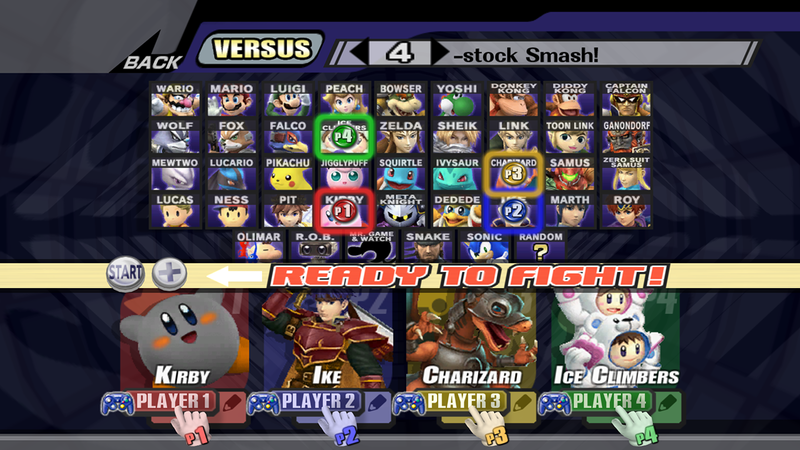
Here's the example:
I'm trying to keep my CSS screen to remain just like this, when the "Ready to Fight" bar appears.
Here's an example of Project M's CSS removing the dark effect to make it a little more clear of what I mean:
#8
Portraits, Menus, (etc...) / Unit's Custom Origins & Franchise Icons
September 04, 2016, 03:39:34 AM
Just some things I did after I downloaded other people's stages. I felt that they lacked some series icons and origins so I made some to go for their respective stages (as well as for stages I made myself). I don't know if some of these have been made already, but I decided to share them anyway.
Series Icons
------------------
Cave Story: Touhou:
 RWBY (Ruby's):
 Gurren Lagann:
Corpse Party: Capcom Vs. SNK 2:
  Arc Rise Fantasia:
 Okami:
Nintendo Gamecube:
-----------------------------------------------------------------------------
Stage Origins
------------------
 - (Touhou Project)





-----------------------------------------------------------------------------
How to install: - I would assume you know your way around already. If you're not:
If you experience any freeze issues when replacing your files (as in for the series icons only since origins don't need to be indexed), try opening up the images you just downloaded in Photoshop (or any photo editing software) and index them. Once you've indexed your images, save them and then re-replace your files in brawlbox. It should get it to work.
Series Icons
Cave Story:
Touhou:RWBY (Ruby's):Gurren Lagann:Corpse Party:
Capcom Vs. SNK 2: Arc Rise Fantasia:Okami:Nintendo Gamecube:
Stage Origins
- (Touhou Project) - Just simply Right-Click any of desired Series Icon or Stage Origin you want and click on Save Image As and save it onto your desktop.
- Open up your sc_selmap.pac.
- Look for your MiscData[80] and expand it. There, you'll find the texture files for stage origins and series icons.
- Replace the desired icon or origin your stage is going over and make sure it's formatted correctly. (l4 for Franchise Icons and lA4 for Stage Origins.
If you experience any freeze issues when replacing your files (as in for the series icons only since origins don't need to be indexed), try opening up the images you just downloaded in Photoshop (or any photo editing software) and index them. Once you've indexed your images, save them and then re-replace your files in brawlbox. It should get it to work.
#9
Stages / Re: Unit's Stuff: Back after long inactivity. New Stage released: Outer Wall.
August 31, 2016, 05:48:57 AM
Hey, it's been a while since I last updated. I've been modifying my Brawl over the summer and just recently installed Brawlex. I've also been in the making of stages at the same time. Nothing big though. :P
Also did some clean up in this thread and made it look a bit more fancy.
Click on the image in the OP for more pics.

Also did some clean up in this thread and made it look a bit more fancy.
Click on the image in the OP for more pics.
#10
General Hacking Discussion / Re: Classic Exp. Pack for Brawl - 8.0s
August 16, 2016, 05:17:38 PM
Hey, so I just tested all the levels on the Classic expansion pack 7.0. I just noticed that Pokemon Stadium (Melee) tends to freeze upon loading. Is there a fix on that issue on 8.0?
EDIT:
So I just found out what my culprit was in the Classic Expansion Pack version 7.0. Since it's not letting me post images for some reason, I'll leave here in links:
Image set 1: My Music - Menu disguising as Pokemon Stadium
http://imgur.com/gibI6Lh
http://imgur.com/pw6n1li
Image set 2: My Music - Menu
http://imgur.com/EQBjmv6
http://imgur.com/a/ezaeO
It was a little confusing at first since Custom Stages appear as Pokemon Stadium on the My Music Menu, but since I kept referring to the Stage Selection menu, I was able to find out which Pokemon Stadium Icon was the REAL Pokemon Stadium, and not a Custom Stage on the My Music Menu. Which is supposed to be the Icon that comes right after Big Blue (see image in the link in Set 1).
But since I was able to make it easier to explain my situation, I discovered that the Main Menu was also disguising up as Melee's Pokemon Stadium, even though, it has an icon of it's own that should only appear on the My Music Menu. Since playing on the Main Menu as a stage would crash, it explains why Pokemon Stadium wasn't able to work when I selected it to Brawl on as a stage.
So to summarize it: The Pokemon Stadium Icon on the Melee's Stage Selection page is what I believe to be the Main Menu, and it freezes because it doesn't actually load up Pokemon Stadium.
So anyone familiar with the Custom Stage Selection Code, wanna help me out on how to get Melee's Pokemon Stadium to work again on this code? It's the only stage that crashes because it supposedly leads to the Main Menu when trying to Brawl on it.
Edit again:
I just decided to download the latest pack, which fixes the issue.
EDIT:
So I just found out what my culprit was in the Classic Expansion Pack version 7.0. Since it's not letting me post images for some reason, I'll leave here in links:
Image set 1: My Music - Menu disguising as Pokemon Stadium
http://imgur.com/gibI6Lh
http://imgur.com/pw6n1li
Image set 2: My Music - Menu
http://imgur.com/EQBjmv6
http://imgur.com/a/ezaeO
It was a little confusing at first since Custom Stages appear as Pokemon Stadium on the My Music Menu, but since I kept referring to the Stage Selection menu, I was able to find out which Pokemon Stadium Icon was the REAL Pokemon Stadium, and not a Custom Stage on the My Music Menu. Which is supposed to be the Icon that comes right after Big Blue (see image in the link in Set 1).
But since I was able to make it easier to explain my situation, I discovered that the Main Menu was also disguising up as Melee's Pokemon Stadium, even though, it has an icon of it's own that should only appear on the My Music Menu. Since playing on the Main Menu as a stage would crash, it explains why Pokemon Stadium wasn't able to work when I selected it to Brawl on as a stage.
So to summarize it: The Pokemon Stadium Icon on the Melee's Stage Selection page is what I believe to be the Main Menu, and it freezes because it doesn't actually load up Pokemon Stadium.
So anyone familiar with the Custom Stage Selection Code, wanna help me out on how to get Melee's Pokemon Stadium to work again on this code? It's the only stage that crashes because it supposedly leads to the Main Menu when trying to Brawl on it.
Sorry but you are not allowed to view spoiler contents.
Edit again:
I just decided to download the latest pack, which fixes the issue.
#11
General Hacking Discussion / Re: Classic Exp. Pack for Brawl - 8.0s
August 13, 2016, 01:53:55 AM
Question:
So I downloaded the Classic Expansion Pack 7.0 from the OP, and when I took a look at sc_selmap.pac's MiscData80, I noticed that only origins from Super Smash Bros. 64, Melee, Brawl, and Smash 4's exists.
So my question is:
If I wanted to re-add an origin into the MiscData80 again, For Example: Star Fox, would stages like Lylat Cruise and Corneria have their stage listed that they're from Star Fox? Or would it still say the stage origin is from Super Smash Bros. Brawl and Melee?
Edit:
Nevermind, I tested it myself and the it exceeds the file size limit. I already came up with an alternate solution on including origins for stages, while keeping the file size limit from exceeding. It won't look nice but it's for the best.
So I downloaded the Classic Expansion Pack 7.0 from the OP, and when I took a look at sc_selmap.pac's MiscData80, I noticed that only origins from Super Smash Bros. 64, Melee, Brawl, and Smash 4's exists.
So my question is:
If I wanted to re-add an origin into the MiscData80 again, For Example: Star Fox, would stages like Lylat Cruise and Corneria have their stage listed that they're from Star Fox? Or would it still say the stage origin is from Super Smash Bros. Brawl and Melee?
Edit:
Nevermind, I tested it myself and the it exceeds the file size limit. I already came up with an alternate solution on including origins for stages, while keeping the file size limit from exceeding. It won't look nice but it's for the best.
#12
Programming / Re: The Brawl Expansion Project
August 04, 2016, 07:09:23 AM
Alright, then. Since I already have a copy of Brawl saved on to my old laptop somewhere, I'll just copy it over and test it on Dolphin. Thanks for the info. :P
#13
Programming / Re: The Brawl Expansion Project
August 04, 2016, 06:38:28 AM
Anywho, thanks for the help guys! I've tested the random selection with the CSSRoster.dat and the two BrawlEx characters I included loaded perfectly.
However, I've been facing another issue for a while now. Some times when selecting Random as a character and loading a Stage, I encounter a random freeze before the match starts. Since it's Random, it only happens when that one unknown character & costume is selected, so the chances for the game to freeze are slim.
So far I've tested:
If you guys encountered the same problem and was able to fix this, please let me know, unless it's just an issue that has to do with Brawlex being installed. For now, one of my Fighters just aren't being nice when selected in Random.
However, I've been facing another issue for a while now. Some times when selecting Random as a character and loading a Stage, I encounter a random freeze before the match starts. Since it's Random, it only happens when that one unknown character & costume is selected, so the chances for the game to freeze are slim.
So far I've tested:
- All of my characters (including Original & BrawlEx Fighters that has Cbliss applied to them through BrawlEx) along with their alternate costumes on the stage it frozed on. And everything loaded fine.
- Double checked my CSSRoster.dat if proper ID's were included into both the CSS screen and Custom Random. Found nothing wrong, there.
- All Cosmetics such as BP's, portraits, and stocks etc. are working fine. (Don't see why there would be a problem there since they all load fine during stock matches and 1 player modes. <_<)
- The two BrawlEx characters I included in Random. They load fine since I've encountered them during a match without any issues.
If you guys encountered the same problem and was able to fix this, please let me know, unless it's just an issue that has to do with Brawlex being installed. For now, one of my Fighters just aren't being nice when selected in Random.
#14
Help / Re: Stage Select Screen no longer loading
August 03, 2016, 11:40:32 PM
Have you tried running just normal Brawl? If you're able to enter the Stage Selection screen through normal Brawl, then it has to be something within your SD card. Also, if you downloaded any alternate costumes over Ike besides changing his portraits, be sure to check with that as well.
#15
Programming / Re: The Brawl Expansion Project
August 03, 2016, 01:09:16 AMQuote from: Ebola16 on August 02, 2016, 11:23:52 PM
You could try editing the scale and/or position of the CSS icons to avoid overlapping in
sc_selcharacter.pac -> MiscData[30] -> MenSelchrPos_TopN.mdl0
and
sc_selcharacter.pac -> MiscData[30] -> MenSelchrPos_TopN.chr0
but those things can be somewhat complicated to do (make a backup if you try).
Also, CSSRoster.dat handles the functionality of both custom CSS and custom random codes so you will probably want to edit that instead.
Alright. I'll keep that in mind.
Also, I forgot to include in my previous post that my Random CSS icon isn't the very last icon on the CSS list, in which, I have a Custom Random Code that only includes original fighters that's separately active since it saves me from having any issues. But I'll mess with my CSSRoster.dat as well as deactivating the code see the outcome I get.