

Are you still taking requests?
This section allows you to view all posts made by this member. Note that you can only see posts made in areas you currently have access to.
#1
Portraits, Menus, (etc...) / Re: TheRealHeroOfWinds CSP Thread *Taking Requests*
April 14, 2016, 03:32:04 AM #2
Model Imports / Beerus (Dragon Ball Xenoverse) over Lucario
April 30, 2015, 03:44:12 PM
Well, since I fail at rigging anything (being that I don't know how to rig at all and even a noob's guide to rigging has failed me with errors while trying to do it), I want someone else to attempt to rig the model for Beerus from Dragon Ball Xenoverse over Lucario.
Now, I am aware of the fact that a Beerus/Bills already exists as a mod over Lucario, but I will reiterate that this is the model from Dragon Ball Xenoverse (and personally, the model available on this site is.....kinda ugly....). So, I will include a download of anything a rigger needs to rig with. If additional materials are required, I will do my best to add them to an updated download.
Link to the items needed (will update if possible):
http://www.mediafire.com/download/trx9r1s6cg49rym/beerus+xenoverse+model+for+rigging+on+to+lucario.rar
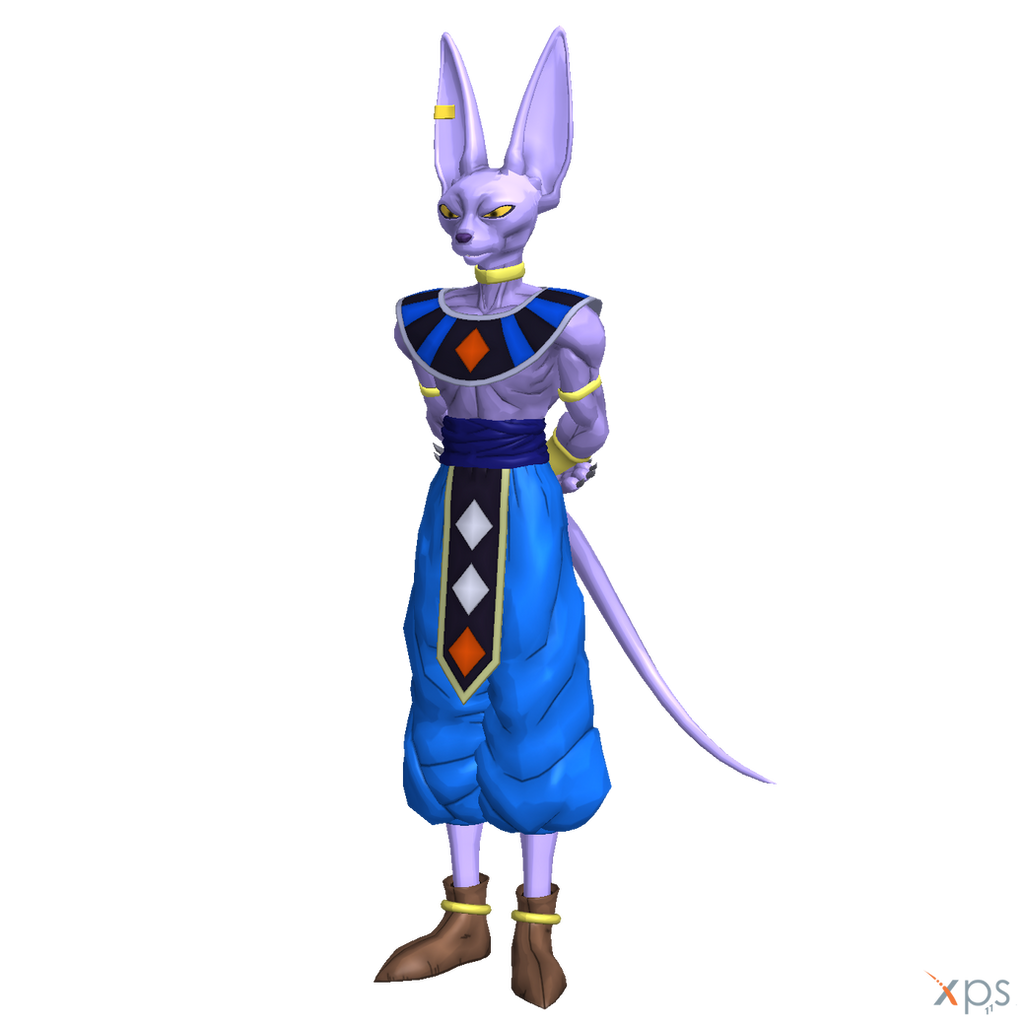
PS: Do remind me to move this if I posted it in the wrong location (again...).
Now, I am aware of the fact that a Beerus/Bills already exists as a mod over Lucario, but I will reiterate that this is the model from Dragon Ball Xenoverse (and personally, the model available on this site is.....kinda ugly....). So, I will include a download of anything a rigger needs to rig with. If additional materials are required, I will do my best to add them to an updated download.
Link to the items needed (will update if possible):
http://www.mediafire.com/download/trx9r1s6cg49rym/beerus+xenoverse+model+for+rigging+on+to+lucario.rar
PS: Do remind me to move this if I posted it in the wrong location (again...).
#3
Programming / Re: Working BrawlEx with Project M!
April 27, 2015, 10:52:08 PMQuoteI have heard that apparently the latest version of Project M, 3.02, has built in codes so that cloning and easily editing of things is more difficult... Well thanks to MachWindEX, who has provided us with an older version of Project M, we can attempt to mess with version 2.1!
Here is the download link for 2.1: http://www.mediafire.com/download/z6x23d8p7n9ao3b/project+m+2.1.zip
Link is dead.
#4
Programming / Re: The Brawl Expansion Project
April 17, 2015, 09:44:07 PMQuote from: PhantomWings on April 17, 2015, 04:46:18 AMAlright. When I get the chance to (once again because busy), I'll try it.
Crashing due to hovering over the icon implies an error in the CSP data. To confirm this, you could try changing the CSSSlot config file's cosmetic ID to someone that you know already works like Mario. If it still crashes, then it is likely there is something wrong with your core BrawlEx file setup.
#5
Programming / Re: The Brawl Expansion Project
April 17, 2015, 02:25:44 AMQuote from: secretchaos1 on April 16, 2015, 10:36:09 PMI dunno. I'll have to check whenever I can.
Do the files work over the normal Lucario? Are the loaded files going over Lucario's file size limit?
Regarding file size limit, the texture and model are way below the limit, and the moveset is about 90 kb over. The FitLucario clone file I'm using is about 100 kb over.
I may just replace them with the normal ones and see what happens, because FitLucarioMotionEtc.pac and the FitLucario.pac files I'm using are from a custom PSA. I will post my progress whenever I get the chance.
EDIT1: I got the chance, and tested the clone with normal files (save for the model-texture file for the clone) and right when I went to hover my cursor over the clone, the game crashes. Sooooo........what did I do wrong?
#6
Programming / Re: The Brawl Expansion Project
April 16, 2015, 06:37:05 PMQuoteSorry about that.
Sometimes people won't respond if they don't know the answer to your question. Things are less active here as of late too so patience is a must.
You might wanna check your battle portraits, if they're incorrectly named or placed the game will crash before it has a chance to load them. If it's a silent crash you're missing a required file. If the base character (Lucario I'm assuming in this instance) has anything that the clone character didn't come packaged with (Entry, Final smash, etc) make sure to copy it from the original character's files and slap them in there renamed to your clone (You can find all the original files under the resources page at the top of the site).
Well, I check my BP (it's named correctly), so I don't think that's the problem.
I think I have located the problem: the Lucario files in the Data Partition are missing the FitLucarioFake and FitLucarioEntry files. Unless they are not part of it; otherwise everything is accounted for.
EDIT1: I checked the Mewtwo files within Project M, and they don't seem to have those files. Therefore, I think my file placement is accounted for, yet it continues to crash my game.
#7
Programming / Re: The Brawl Expansion Project
April 16, 2015, 06:52:37 AM
Well, I decided to make a Lucario clone (it's Beerus from Battle of Gods). So here's what's going on.
I have the BrawlEx .rel that exists for Lucario (as well as the regular one). I used the BrawlEx one first for the clone. I start up the game and go to select Beerus. Once I select my clone, the game crashes. So I use the regular .rel for Beerus and I'm able to get further this time. However, when I start a match, the game crashes.
I've tried everything I know to do and this is surprisingly my first time cloning. Is there something I am doing wrong? Please do tell me.
EDIT1: It seems I am being ignored when I clearly need help....-.-
I have the BrawlEx .rel that exists for Lucario (as well as the regular one). I used the BrawlEx one first for the clone. I start up the game and go to select Beerus. Once I select my clone, the game crashes. So I use the regular .rel for Beerus and I'm able to get further this time. However, when I start a match, the game crashes.
I've tried everything I know to do and this is surprisingly my first time cloning. Is there something I am doing wrong? Please do tell me.
EDIT1: It seems I am being ignored when I clearly need help....-.-
#8
Help / Re: I has a major problem. Let's see if the brainiest brains can help me.
December 03, 2014, 04:26:10 AMQuote from: Roy935 on December 02, 2014, 09:57:00 PMWell, crap..
Gecko usally does that if the code file is to big, or you have to many codes. Riivolution, im not to sure.
#9
Help / I has a major problem. Let's see if the brainiest brains can help me.
December 02, 2014, 05:10:44 AM
Well, I tried loading hacks in Riivolution like I sometimes do, but for some reason, after it cuts to black, the console just freezes on the black before transitioning to the Strap Screen. And in case anyone is wondering, I am using Riivolution Version 1.04 and have checked every file on the SD card for any faults.
Which also brings me to tell you that now my Gecko won't work. It froze right after the "Now Loading..." screen.
Yet, despite all of this, Project M works like a charm. :-\
Like I said, I checked to make sure every file is accounted for. Is there something wrong with my console, or maybe the files or SD card?
Note: if I'm posting in the wrong place, please let me know.
Which also brings me to tell you that now my Gecko won't work. It froze right after the "Now Loading..." screen.
Yet, despite all of this, Project M works like a charm. :-\
Like I said, I checked to make sure every file is accounted for. Is there something wrong with my console, or maybe the files or SD card?
Note: if I'm posting in the wrong place, please let me know.
#10
Programming / Re: The BrawlEx Clone Engine
March 18, 2014, 03:17:49 PMQuote from: ShinF on March 17, 2014, 04:09:30 AMAlright, just wanted to know. Thanks.
No.
#11
Programming / Re: The BrawlEx Clone Engine
March 17, 2014, 04:07:53 AM
If anyone already asked, please do tell me, but BrawlEX supports Project M, right?
#12
Rules / Feedback / Brawl Vault / Re: Brawl Vault Community Support
September 13, 2013, 12:29:55 AMQuote from: パンドラのハート on September 12, 2013, 06:26:53 PM
Fixed the download. Pictures are still broken, so i reported it for that.
Quote from: Iwvi on September 12, 2013, 11:30:18 PM
Seems like pictures were uploaded to the forums, don't know how that even works, but it doesn't generate previews. I was bored so I moved them to imgur.
http://forums.kc-mm.com/Gallery/BrawlView.php?Number=229
fixed.
Thanks, you guys, so much.
#13
Rules / Feedback / Brawl Vault / Re: Brawl Vault Community Support
September 12, 2013, 03:17:06 PM #14
Programming / Re: Sawndz 0.12 - RELEASED
February 15, 2013, 11:05:06 PMQuote from: Jaklub on August 21, 2011, 11:01:28 AMI tried it. It didn't work for me. :c
Are you using a toaster or a computer? ;p j/k. You have to resort to the more work-involving way.
1. Get those 3 files on your own and put them into the directory with Sawndz.
soundfile.dll
sndconv.exe
dsptool.dll
2. You still need the smashbros_sound.brsar in your directory.
3. If you want to insert a single .wav sound, rename it to sound.wav and put it into your directory with Sawndz. Create a text file, e.g. sawnd.txt. Open it and copy-paste that:Code SelectBEGIN a
File sound.wav
OUTPUT ADPCM
END
Next, use command line to run this
sndconv sawnd.txt -a
Instead of sawnd.txt write the name of your text file.
After that operation, run this in your command line.
sawndz insert -groupid -collid -wavid -frequency 0
ALL ARGUMENTS IN DECIMAL.
Instead of -groupid write the group ID of the group your sound is in.
Instead of -collid write the collection ID of the collection your sound is in.
Instead of -wavid write the wave ID of the wave you want to replace.
Instead of -frequency write the frequency of your sound.
0 should always be there at the end.
I assume you probably won't be using base wave functionality, so I'll explain it some other time.
4. If you want to create a sawnd file, first make sure there is no sawnd.sawnd file in the directory with Sawndz. Then run this from command line
sawndz sawndcreate -groupid
Instead of -groupid write the group ID of the group of which you want to create the sawnd file. In decimal.
5. If you want to insert a sawnd file, rename it to sawnd.sawnd and put it into directory with Sawndz. Then run this from command line
sawndz sawnd
6. If you want to insert a hex packet, rename it to hex.hex and put it into directory with Sawndz. Then run this from command line
sawndz hex -groupid
Instead of -groupid write the ID of group which hex packet replaces. In decimal.
And that's pretty much it. To get the group IDs, collection IDs and wave IDs refer to the image included with Sawndz. Use SmashBox 0.57 to open your brsar.
#15
Programming / Re: Super Sawndz!
February 14, 2013, 10:13:51 PMQuote from: Diddy Kong on February 14, 2013, 07:35:44 AM
use CMD to open sawndz, rename blah.sawnd to sawnd.sawnd, put the b rsar in the same directory as sawndz
type sawndz.exe sawnd
sawndz.exe is to run sawndz
sawnd tells it to inject a sawnd file
or use this http://www.mediafire.com/download.php?psv3be82xcj4ado
I'm lost on that. ^^"
Essentially, I'm stuck.