

Menu

Show posts

This section allows you to view all posts made by this member. Note that you can only see posts made in areas you currently have access to.

Show posts Menu

Messages - Mewcario

#1
For some reason, this thread mentions the File Patch Code 4.0...but that version of the code is buggy as hell, and has been abandoned for a while now. The best version of this code is 3.5.1.

File Patch Code v3.5.1

Sorry but you are not allowed to view spoiler contents.
#2
Programming / Re: Super Sawndz!
December 09, 2013, 08:05:41 PM
WHOOMP THERE IT IS

...I fixed the problem. RevenantGenesis, here's the fix.

Open your folder where Super Sawndz was saved; the .zip should have also included the original sawndz.exe. Do you get an error saying that a file is missing from your computer? If so, download and install the Microsoft Visual C++ 2010 Redistributable Package (x86). Chances are, you'll be missing a few files, and this pack contains all the ones you'll need.

The problem was that I didn't have all the Microsoft Visual C++ files on my computer that Sawndz, as a program, needed in order to run. Sawndz wasn't even running, so naturally, no .sawnd was being created.

Maybe this should be added to the first post? Seems like a couple people here and there had (have?) the same issue.
----------------------------------------------------------------------------------------


ORIGINAL PROBLEM FOLLOW-UP (solved, of course)
Sorry but you are not allowed to view spoiler contents.
#3
Programming / Re: Super Sawndz!
December 08, 2013, 05:39:46 PM
Quote from: RevenantGenesis on November 29, 2013, 08:55:47 AM
Sorry but you are not allowed to view spoiler contents.

THIS. SO HARD. What could be causing this? The program just won't create the .sawnd. Could I be missing a file? I have:

- dsptool.dll
- empty.wav
- readme.txt
- sawndz.exe
- the brsar file I'm using
- sndconv.exe
- soundfile.dll
- Super Sawndz.exe
#4
Question moved to "Super Sawndz!" thread.

Sorry but you are not allowed to view spoiler contents.
#5
Programming / Re: cBliss v1.5 [16?]
December 07, 2013, 03:20:50 AM
Ahh, I see... So that's why it's set up that way. In that case, to change the optional stock icons, I'd just edit them through Bbox as I would have pre-cBliss. Thank you for clarifying!
#6
Programming / Re: cBliss v1.5 [16?]
December 06, 2013, 05:16:07 PM
I'm confused in terms of the first post's instructions regarding stock icon replacement. Here's what I DO know:

- I'm replacing the stock icons from the Brawl Costume Manager's interface
- None of my new icons are too large (file size), and they do have transparency (.png)
- The Costume Manager replaces the stock icons from common5>sc_selcharacter> MiscData[90]
- Brawl seems to load the stock icons from common5>sc_selmap>MiscData[40]

I'm sure this has been answered before, but...c'mon. There are 50 pages of thread here. My only real issue is making sense of the instructions.
#7
Excellent. Thanks, Diddy! Now, I just have to figure out why Super Sawndz won't actually save any exported soundbanks to my computer...
#8
Quote from: HaloFanODST on September 25, 2013, 09:20:51 PM
I click "Create sawnd", it sends me to save my file.
But it doesn't create the sawnd file, I cannot find it.

Super bump. I'm having the same problem, and this was never answered.

On a similar note, what volume / dB range is recommended for SFX? My sounds from Riivo were way too quiet, and they're on the verge of clipping.
#9
Programming / Re: Sawndz 0.12 - RELEASED
July 06, 2013, 04:51:01 AM
Wow... Don't I feel stupid.  :>.>palm:

I'll just go get the actual program now... Thanks so much!

-----------------------------------------------------------------------------

EDIT:

Issue #2:
Sorry but you are not allowed to view spoiler contents.


Super Sawndz screen:
Sorry but you are not allowed to view spoiler contents.
[/spoiler]


Forget it; now Sawndz is working again for some inexplicable reason. *sigh*
#10
What is the best decibel range for SFX? Mine tend to be too quiet, so I have to increase the volume in BBox, and even then it might still be very quiet.
#11
Programming / Re: Sawndz 0.12 - RELEASED
July 04, 2013, 11:48:51 PM
I'm just gonna...go ahead and...slip these in here real quick.

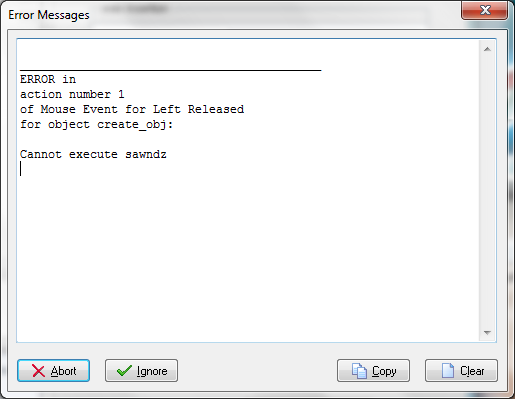
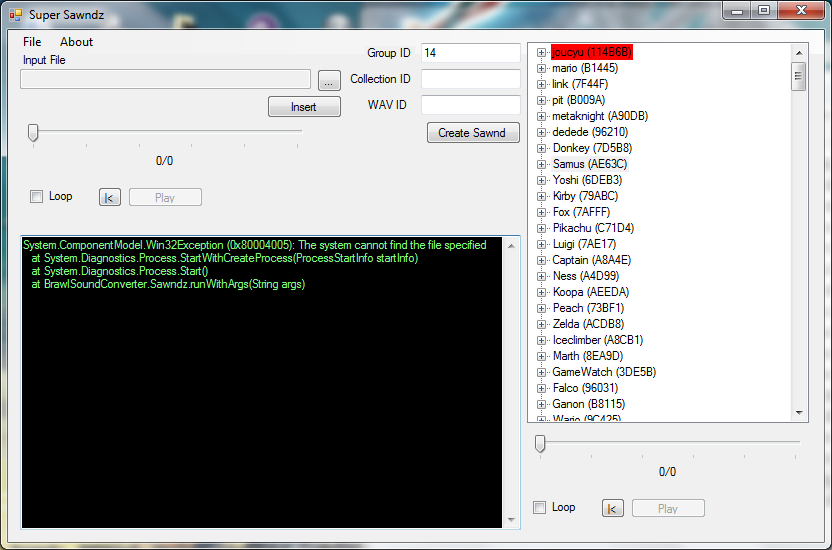
Neither SAWNDZ nor Super SAWNDZ--the latter, I'm aware was not programmed by the same user as the former--will let me create a SAWND. Now, maybe I'm doing it wrong, but I don't think there's anything more to be done than specifying the Group ID and clicking "Create SAWND." Here are the errors
, which are getting no attention in the Help subforum...


#12
Quote from: Mewtwo2000 on July 04, 2013, 03:05:11 PM
In both cases the color teams are restored to the Brawl defaults (or Project M, if you get the PM sets).

So, if I use your stable version, I'll have to change around all my team costumes that are currently compatible with cBliss 1.5 to how Brawl originally read them (ie, FitChar01 isn't always red team)? And, because of that, the Brawl Costume Manager's cBliss setting is no longer compatible with cBliss itself?
#13
Quote from: Diddy Kong on July 03, 2013, 10:33:01 PM
gecko OS: 2GB
riivolution: 32GB

... ... .........

Well, damn. I need to upgrade!! XD Thanks
#14
Programming / Re: cBliss v1.5 [16?]
July 03, 2013, 04:08:50 PM
The cBliss codes aren't even loading for me (in Riivolution; haven't tried Gecko). I copied the codes exactly, moved a TON of files around, loaded up 10 different Lucario textures/models--all complete with CSPs--as a test...and nothing. It's as if I haven't even added the codes at all. What the hell could I be missing...?

Any fellow Riivolution users out there have flawless cBliss? I'm using Riivolution v1.04, by the way.
#15
Is 1GB still the biggest SD card that's compatible with the SD Loader method of hacking? Or are we waaay past that? I'm starting to run out of space on mine...